
Putting It All Together
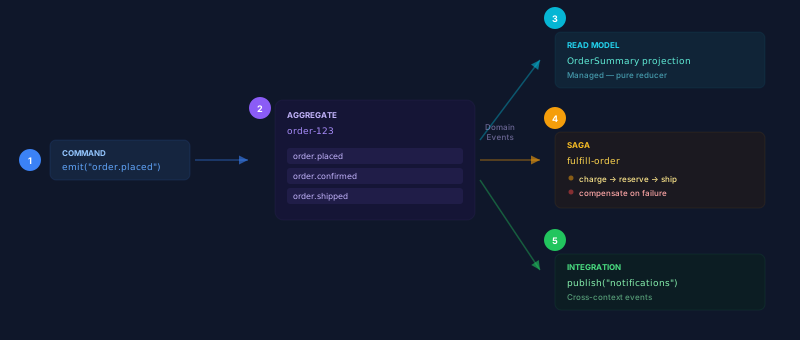
This walkthrough builds a complete Order Management domain using every DDD pattern covered in this section. We’ll model an e-commerce order lifecycle — placing orders, processing payments, managing fulfillment, and building read models.
The Domain
Section titled “The Domain”Our Order Management system handles:
- Placing orders — customers submit orders with items and shipping address
- Processing payments — charge the customer via a payment gateway
- Fulfilling orders — reserve inventory and create shipping labels
- Tracking status — real-time order status for customers and internal dashboards
- Notifying external systems — send events to notification and analytics services
Step 1: Model the Aggregate
Section titled “Step 1: Model the Aggregate”The Order aggregate is an entity stream. Its identity is the order ID, and its state is derived from the sequence of domain events.
Events in the Order aggregate:
| Event | Meaning |
|---|---|
order.placed |
Customer submitted an order |
order.confirmed |
Inventory validated, order accepted |
order.paid |
Payment charged successfully |
order.shipped |
Shipment created and dispatched |
order.cancelled |
Order cancelled (before shipment) |
import { createClient } from "@ironflow/node";
const ironflow = createClient({ apiKey: process.env.IRONFLOW_API_KEY });
// Place a new order — create the aggregateasync function placeOrder(orderId: string, data: OrderData) {  await ironflow.streams.append(`order-${orderId}`, {    entityType: "order",    name: "order.placed",    data: {      orderId,      customerId: data.customerId,      items: data.items,      total: data.total,      shippingAddress: data.address,    },  }, { expectedVersion: 0 }); // Must be a new aggregate}
// Transition the aggregate — with invariant enforcementasync function confirmOrder(orderId: string) {  const { events } = await ironflow.streams.read(`order-${orderId}`);  const info = await ironflow.streams.getInfo(`order-${orderId}`);  const version = info?.version ?? 0;  const state = rebuildOrderState(events);
  if (state.status !== "placed") {    throw new Error(`Cannot confirm order in status: ${state.status}`);  }
  await ironflow.streams.append(`order-${orderId}`, {    entityType: "order",    name: "order.confirmed",    data: { confirmedAt: new Date().toISOString() },  }, { expectedVersion: version });}
function rebuildOrderState(events: any[]) {  return events.reduce((state, event) => {    switch (event.name) {      case "order.placed":        return { ...event.data, status: "placed" };      case "order.confirmed":        return { ...state, status: "confirmed" };      case "order.paid":        return { ...state, status: "paid" };      case "order.shipped":        return { ...state, status: "shipped" };      case "order.cancelled":        return { ...state, status: "cancelled" };      default:        return state;    }  }, { status: "unknown" });}
Step 2: Define Command Handlers
Section titled “Step 2: Define Command Handlers”Functions react to domain events and execute business logic. The order.placed event triggers the confirmation workflow:
import { ironflow, createClient } from "@ironflow/node";import { NonRetryableError } from "@ironflow/core";
const client = createClient();
export const validateOrder = ironflow.createFunction(  {    id: "validate-order",    triggers: [{ event: "order.placed" }],  },  async ({ event, step }) => {    // Check inventory availability    const available = await step.run("check-inventory", async () => {      return await inventoryService.checkAvailability(event.data.items);    });
    if (!available) {      // Cancel the order — append to the aggregate      await step.run("cancel-order", async () => {        await client.streams.append(`order-${event.data.orderId}`, {          entityType: "order",          name: "order.cancelled",          data: { reason: "Items out of stock" },        });      });      return;    }
    // Confirm the order    await step.run("confirm-order", async () => {      await confirmOrder(event.data.orderId);    });  },);
Step 3: Build Read Models
Section titled “Step 3: Build Read Models”A managed projection builds the OrderDashboard read model — an aggregated view of all orders, updated in real time:
import { createProjection } from "@ironflow/node";
export const orderDashboard = createProjection({  name: "order-dashboard",  events: ["order.placed", "order.confirmed", "order.paid", "order.shipped", "order.cancelled"],  handler: (state, event) => {    const orderId = event.data.orderId;    const existing = state.orders[orderId] ?? {};
    switch (event.name) {      case "order.placed":        return {          ...state,          totalOrders: state.totalOrders + 1,          orders: {            ...state.orders,            [orderId]: {              id: orderId,              customerId: event.data.customerId,              total: event.data.total,              status: "placed",              placedAt: event.timestamp,            },          },        };
      case "order.confirmed":      case "order.paid":      case "order.shipped":      case "order.cancelled":        return {          ...state,          orders: {            ...state.orders,            [orderId]: {              ...existing,              status: event.name.split(".")[1],            },          },        };
      default:        return state;    }  },  initialState: () => ({ totalOrders: 0, orders: {} }),});
A partitioned projection gives per-customer analytics:
export const customerOrders = createProjection({ name: "customer-orders", events: ["order.placed", "order.shipped"], partitionKey: "$.data.customerId", handler: (state, event) => ({ ...state, orderCount: state.orderCount + (event.name === "order.placed" ? 1 : 0), shippedCount: state.shippedCount + (event.name === "order.shipped" ? 1 : 0), totalSpend: state.totalSpend + (event.data.total ?? 0), }), initialState: () => ({ orderCount: 0, shippedCount: 0, totalSpend: 0 }),});Step 4: Coordinate with Sagas
Section titled “Step 4: Coordinate with Sagas”The fulfillment saga runs when an order is confirmed — it charges payment, reserves inventory, and creates the shipment:
import { NonRetryableError } from "@ironflow/core";
export const fulfillOrder = ironflow.createFunction(  {    id: "fulfill-order",    triggers: [{ event: "order.confirmed" }],  },  async ({ event, step }) => {    const orderId = event.data.orderId;
    // Step 1: Charge payment    const payment = await step.run("charge-payment", async () => {      return await stripe.charges.create({        amount: event.data.total,        customer: event.data.customerId,      });    });    step.compensate("charge-payment", async () => {      await stripe.refunds.create({ charge: payment.id });    });
    // Record payment in aggregate    await step.run("record-payment", async () => {      await client.streams.append(`order-${orderId}`, {        entityType: "order",        name: "order.paid",        data: { paymentId: payment.id },      });    });
    // Step 2: Reserve inventory    const reservation = await step.run("reserve-inventory", async () => {      return await inventoryService.reserve(event.data.items);    });    step.compensate("reserve-inventory", async () => {      await inventoryService.release(reservation.id);    });
    // Step 3: Create shipment    const shipment = await step.run("create-shipment", async () => {      const result = await shippingService.createLabel(event.data.address);      if (!result.ok) {        throw new NonRetryableError("Shipping unavailable");      }      return result;    });
    // Record shipment in aggregate    await step.run("record-shipment", async () => {      await client.streams.append(`order-${orderId}`, {        entityType: "order",        name: "order.shipped",        data: { trackingNumber: shipment.trackingNumber },      });    });  },);
Step 5: Integrate Contexts
Section titled “Step 5: Integrate Contexts”After the order ships, publish integration events for external systems:
export const notifyShipment = ironflow.createFunction(  {    id: "notify-shipment",    triggers: [{ event: "order.shipped" }],  },  async ({ event, step }) => {    // Publish integration events — lean, cross-context    // step.publish() is durable and memoized    await step.publish("notifications.shipment", {      orderId: event.data.orderId,      trackingNumber: event.data.trackingNumber,    });
    await step.publish("analytics.revenue", {      orderId: event.data.orderId,      total: event.data.total,    });  },);
Register Everything
Section titled “Register Everything”Wire up all functions and projections in your worker:
import { createWorker } from "@ironflow/node";
const worker = createWorker({  functions: [validateOrder, fulfillOrder, notifyShipment],  projections: [orderDashboard, customerOrders],});
await worker.start();
How It All Connects
Section titled “How It All Connects”| DDD Pattern | Ironflow Primitive | This Example |
|---|---|---|
| Aggregate | Entity Stream | order-{id} stream with placed/confirmed/paid/shipped events |
| Command Handler | Event-triggered Function | validate-order reacts to order.placed |
| Domain Events | emit() + streams.append() |
order.confirmed, order.paid, order.shipped |
| Read Model (CQRS) | Managed Projection | order-dashboard, customer-orders |
| Saga | Workflow with step.compensate() |
fulfill-order with payment/inventory/shipping |
| Integration Events | step.publish() |
notifications.shipment, analytics.revenue |
Previous pages in this section:
- Why DDD with Ironflow — concept overview and strategic DDD
- Aggregates & Entity Streams — consistency boundaries
- Commands, Events & Reactions — event-driven patterns
- CQRS with Projections — read/write separation
- Sagas & Process Managers — distributed consistency