
Getting Started
Start the server, scaffold a project, emit events, derive state, and time-travel through your system’s Continuous History — all in about five minutes.
1. Start the Server
brew install sahina/tap/ironflowironflow serve --devdocker run -p 9123:9123 ghcr.io/sahina/ironflow-releases:latest serve --devFor persistent data, mount a volume and point the SQLite DB at it (NATS storage is derived from --db):
docker run -p 9123:9123 \ -v ironflow-data:/data \ ghcr.io/sahina/ironflow-releases:latest serve --dev --db /data/ironflow.dbSee Self Hosting for Docker Compose with PostgreSQL.
Save this as docker-compose.yml:
name: ironflowservices:  ironflow:    image: ghcr.io/sahina/ironflow-releases:${VERSION:-latest}    command: serve --dev --db /data/ironflow.db    ports:      - "${IRONFLOW_PORT:-9123}:9123"    volumes:      - ironflow-data:/data # Persists NATS JetStream and SQLite data    healthcheck:      test: ["CMD", "wget", "-q", "--spider", "http://localhost:9123/health"]      interval: 10s      timeout: 5s      retries: 3
volumes:  ironflow-data:
Then start it:
docker compose upFor a production setup with PostgreSQL and monitoring profiles, see Self Hosting — it renders the full docker-compose.single-node.yml, which also lives in the public release repo.
Download the latest release from GitHub Releases for your platform, then:
./ironflow serve --devThe server starts at http://localhost:9123 with:
- Dashboard at
/ - API at
/api/v1/* - Health check at
/health
The --dev flag disables authentication so you can start building immediately. No API keys or passwords needed.
Production Mode
When you’re ready for real workloads, drop the --dev flag. Ironflow will auto-bootstrap an admin account and API key on first boot — see Security for details.
2. Create Your Project
ironflow init my-appcd my-appThis scaffolds a working project with a function, projection, and worker — ready to run. ironflow init runs pnpm install automatically; pass --skip-install to opt out.
ironflow init my-app --template go-quickstartcd my-apppip install ironflowThe Python SDK is a client-only HTTP wrapper around the REST API — it can emit events, query runs/projections, and manage resources, but it does not yet ship a worker runtime (step.run, push/pull mode). For durable step execution, follow the TypeScript or Go track above. See the Python SDK reference for the full surface and the SDK comparison matrix for feature parity.
Manual setup
You can also install the SDK directly: npm install @ironflow/node (TypeScript), go get github.com/sahina/ironflow-go/ironflow (Go), or pip install ironflow (Python — client only). See the Installation guide for details.
3. Understand the Code
Open worker.ts — this single file contains a function, a projection, and a worker:
import {  createFunction,  createProjection,  createWorker,  type IronflowProjection,} from "@ironflow/node";
// ── Types ───────────────────────────────────────────────────────interface OrderData {  orderId: string;  total: number;  email: string;}
// ── React: A function that processes orders ─────────────────────// Every step is memoized. If the process crashes, it resumes// from the last completed step. With recording enabled, every// step is also permanently recorded for time-travel debugging.const processOrder = createFunction(  {    id: "process-order",    triggers: [{ event: "order.placed" }],    recording: true,  },  async ({ event, step }) => {    const data = event.data as OrderData;
    const order = await step.run("validate-order", async () => {      return {        valid: true,        orderId: data.orderId,        total: data.total,      };    });
    const payment = await step.run("process-payment", async () => {      return {        charged: true,        amount: order.total,        transactionId: `txn_${Date.now()}`,      };    });
    await step.run("send-confirmation", async () => {      return { sent: true, email: data.email };    });
    return { order, payment };  },);
// ── Derive: A projection that computes order statistics ─────────// Projections are pure reducers. Every time an "order.placed"// event is recorded, this reducer runs and the derived state// is automatically persisted and queryable.const orderStats = createProjection({  name: "order-stats",  events: ["order.placed"],  initialState: () => ({ totalOrders: 0, totalRevenue: 0 }),  handler: (    state: { totalOrders: number; totalRevenue: number },    event: { name: string; data: unknown },  ) => ({    totalOrders: state.totalOrders + 1,    totalRevenue: state.totalRevenue + ((event.data as OrderData).total ?? 0),  }),});
// ── Start the worker ────────────────────────────────────────────const worker = createWorker({  functions: [processOrder],  projections: [orderStats as IronflowProjection],});
worker.start().then(() => {  console.log("Worker started — listening for events");});
Start the worker in a second terminal:
pnpm startYou should see: Worker started — listening for events
The Go SDK supports both push mode (Serve()) and pull mode (NewWorker()). The go-quickstart template uses pull mode and mirrors the TypeScript scaffold — ProcessOrder function with three steps plus an OrderStats projection. Open main.go:
package main
import (    "context"    "fmt"    "log"    "os"    "os/signal"    "syscall"
    "github.com/sahina/ironflow-go/ironflow")
type OrderData struct {    OrderID string  `json:"orderId"`    Total   float64 `json:"total"`    Email   string  `json:"email"`}
// React: A function that processes orders. Every step is memoized// and permanently recorded for time-travel debugging.var ProcessOrder = ironflow.CreateFunction(    ironflow.FunctionConfig{        ID:        "process-order",        Name:      "Process Order",        Mode:      ironflow.PullMode,        Recording: true,        Triggers:  []ironflow.Trigger{{Event: "order.placed"}},    },    func(ctx ironflow.Context) (any, error) {        var data OrderData        if err := ctx.Event.Data(&data); err != nil {            return nil, fmt.Errorf("parse order: %w", err)        }
        order, err := ironflow.Run(ctx, "validate-order", func() (map[string]any, error) {            return map[string]any{"valid": true, "orderId": data.OrderID, "total": data.Total}, nil        })        if err != nil {            return nil, err        }
        payment, err := ironflow.Run(ctx, "process-payment", func() (map[string]any, error) {            return map[string]any{"charged": true, "amount": data.Total}, nil        })        if err != nil {            return nil, err        }
        _, err = ironflow.Run(ctx, "send-confirmation", func() (map[string]any, error) {            return map[string]any{"sent": true, "email": data.Email}, nil        })        if err != nil {            return nil, err        }
        return map[string]any{"order": order, "payment": payment}, nil    },)
// Derive: pure reducer over order.placed events.var OrderStats = ironflow.CreateProjection(ironflow.ProjectionConfig{    Name:   "order-stats",    Events: []string{"order.placed"},    Mode:   ironflow.ProjectionModeManaged,    InitialState: func() map[string]any {        return map[string]any{"totalOrders": 0, "totalRevenue": 0.0}    },    Handler: func(state map[string]any, event ironflow.ProjectionEvent, ctx ironflow.ProjectionContext) (map[string]any, error) {        total, _ := event.Data["total"].(float64)        totalOrders, _ := state["totalOrders"].(int)        totalRevenue, _ := state["totalRevenue"].(float64)        return map[string]any{            "totalOrders":  totalOrders + 1,            "totalRevenue": totalRevenue + total,        }, nil    },})
func main() {    worker := ironflow.NewWorker(ironflow.WorkerConfig{        Functions:   []ironflow.Function{ProcessOrder},        Projections: []ironflow.Projection{OrderStats},    })
    ctx, cancel := context.WithCancel(context.Background())    defer cancel()
    sigChan := make(chan os.Signal, 1)    signal.Notify(sigChan, syscall.SIGINT, syscall.SIGTERM)    go func() {        <-sigChan        cancel()        worker.Drain()    }()
    log.Println("Worker started — listening for events")    if err := worker.Run(ctx); err != nil {        log.Fatalf("Worker error: %v", err)    }}
Go SDK fully supports projections — see sdk/go/ironflow/projection.go and the Projections guide. The go-quickstart example ships this scaffold.
4. Emit Events
With the server and worker running, emit an event:
ironflow emit order.placed --data '{"orderId": "order-1", "total": 99.99, "email": "customer@example.com"}'Watch the worker terminal — you’ll see the function pick up the event and execute each step.
Emit a few more to build up history:
ironflow emit order.placed --data '{"orderId": "order-2", "total": 49.50, "email": "another@example.com"}'ironflow emit order.placed --data '{"orderId": "order-3", "total": 149.00, "email": "third@example.com"}'5. See What Was Derived
The order-stats projection has been processing every order.placed event and maintaining a running total. Query it:
curl -s http://localhost:9123/api/v1/projections/order-stats | jq '.state.state'{ "totalOrders": 3, "totalRevenue": 298.49}You didn’t write any aggregation queries. The projection derived this state automatically from the recorded events. Emit another event and query again — the state updates in real time.
You can also see the projection in the Dashboard at http://localhost:9123 — navigate to Projections to see its status and current state.
5.5 See Durability in Action
What happens when something goes wrong mid-execution? Ironflow memoizes every completed step. If a function crashes, it resumes from the last successful step — not from scratch.
Try it: emit an event, then stop your worker mid-execution (Ctrl+C). Restart it:
pnpm startgo run .The worker picks up the interrupted run and completes it from where it left off. Check the Runs page in the dashboard — you’ll see the run completed successfully despite the restart.
Resume timing
In --dev mode the scheduler reclaims an orphaned run after the stale-claim threshold (45s) elapses; the REST-worker cleanup adds up to 90s. Expect the run to resume within ~50s, not instantly. Production cluster mode uses a 2-minute default threshold (see Crash Resume for the full mechanics).
This is memoized execution: each step.run() result is persisted before moving to the next step. Crash at step 3 of 5? Steps 1 and 2 aren’t re-executed. The function resumes at step 3.
6. Rewind Time
Every step of every function run was permanently recorded. You can rewind to any moment.
Dashboard
- Open http://localhost:9123 and navigate to Runs
- Click any completed run
- Use the timeline scrubber at the top to drag back in time
- Watch the step outputs change as you scrub — you’re seeing the exact state of the run at that moment
- Click any two points to see a diff of what changed between them
CLI
# List your runsironflow run list
# Replay a run frame-by-frame (replace with your run ID)ironflow inspect <run_id> --replay
In replay mode:
- → or l — next frame
- ← or h — previous frame
- g — first frame, G — last frame
- j/↓ — navigate steps within current frame
- k/↑ — navigate steps up
- Tab — switch between Steps and Details panels
- q — quit
What Just Happened?
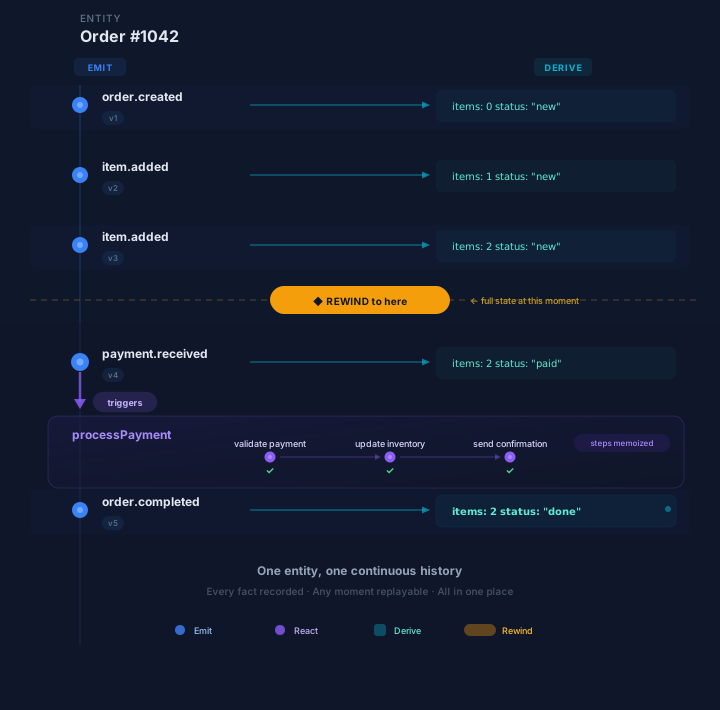
In five minutes, you built a system with Continuous History:
- Emit — You recorded events (
order.placed). These are permanent, immutable facts. - React — A function processed each event with durable, memoized steps. If the process had crashed mid-execution, it would have resumed from the last completed step — not restarted.
- Derive — A projection automatically computed order statistics from the event stream. No queries, no batch jobs — the state is always up to date.
- Rewind — You scrubbed back through the execution timeline and saw the exact state at any moment. The audit trail wasn’t bolted on after the fact — it was always there.
This is the core idea: record every change, derive everything else from it. Events, workflow steps, projections, audit trails, time-travel — all from one continuous history.
Push and Pull Modes
This tutorial used Pull mode — a long-running worker that streams tasks from the server via gRPC. For serverless environments (Next.js, Lambda, Cloud Functions), Ironflow also supports Push mode — the server POSTs to your HTTP endpoint. Same functions, same SDK, different deployment model. See Workflows for details.