
Projections
Projections build read-optimized materialized views from event streams. Instead of reading an entity’s full event history every time, a projection continuously processes events and maintains a derived state you can query instantly.
How It Works
Projections are a split responsibility between your SDK worker and the Ironflow server:
- Your app (SDK) — defines the projection handler and runs it in a streaming or poll loop
- Ironflow server — stores state, manages NATS consumers, serves queries to your frontend
The SDK registers the projection, receives events (via real-time streaming or polling), runs your handler locally, and saves the resulting state back to the server. The server never executes your handler logic — it just feeds events and persists whatever state the SDK sends back.
This means your projection logic lives in your codebase, versioned with your app, while the server handles durability, partitioning, lag tracking, and real-time distribution to connected clients.
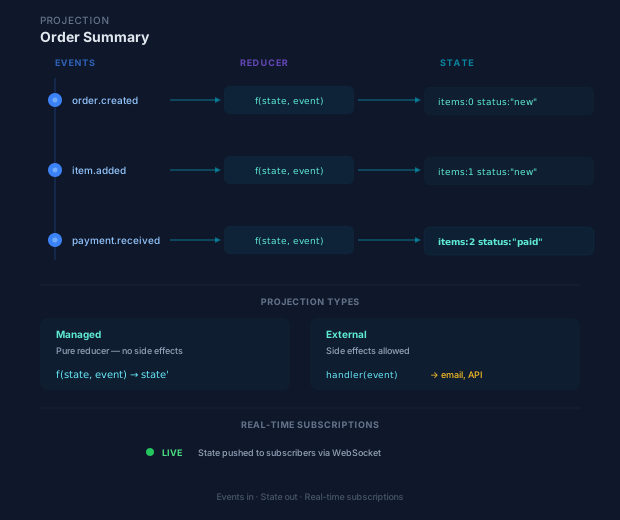
Two Modes
| Mode | State location | Handler type | Use case |
|---|---|---|---|
| Managed | Ironflow DB | Pure reducer (state, event) => newState |
Dashboards, aggregations, read models |
| External | Your database | Side-effect handler (event) => void |
Search indexes, cache warming, third-party sync |
Mode is auto-detected: if you provide initialState, it’s managed. Otherwise it’s external. You can also set mode explicitly.
Managed Projections
A managed projection is a pure reducer — it takes the current state and an event, and returns the new state. Ironflow stores the materialized state in its database.
import { createProjection } from "@ironflow/node";
const orderStats = createProjection({  name: "order-stats",  events: ["order.created", "order.completed"],  handler: (state, event) => {    switch (event.name) {      case "order.created":        return {          ...state,          totalOrders: state.totalOrders + 1,          totalAmount: state.totalAmount + event.data.amount,        };      case "order.completed":        return { ...state, completedOrders: state.completedOrders + 1 };      default:        return state;    }  },  initialState: () => ({    totalOrders: 0,    completedOrders: 0,    totalAmount: 0,  }),});
orderStats := ironflow.CreateProjection(ironflow.ProjectionConfig{ Name: "order-stats", Events: []string{"order.created", "order.completed"}, Handler: func(state map[string]any, event ironflow.ProjectionEvent, ctx ironflow.ProjectionContext) (map[string]any, error) { switch event.Name { case "order.created": state["totalOrders"] = toFloat(state["totalOrders"]) + 1 state["totalAmount"] = toFloat(state["totalAmount"]) + toFloat(event.Data["amount"]) case "order.completed": state["completedOrders"] = toFloat(state["completedOrders"]) + 1 } return state, nil }, InitialState: func() map[string]any { return map[string]any{"totalOrders": 0, "completedOrders": 0, "totalAmount": 0} },})Querying State
Once a managed projection is running, query its state via the REST API or SDK:
import { ironflow } from "@ironflow/browser";
const result = await ironflow.getProjection<OrderStats>("order-stats");console.log(result.state); // { totalOrders: 42, completedOrders: 38, totalAmount: 12500 }console.log(result.mode); // "managed"resp, err := http.Get("http://localhost:9123/api/v1/projections/order-stats")if err != nil { log.Fatal(err)}defer resp.Body.Close()
var result struct { State struct { TotalOrders int `json:"totalOrders"` CompletedOrders int `json:"completedOrders"` TotalAmount float64 `json:"totalAmount"` } `json:"state"` Mode string `json:"mode"`}json.NewDecoder(resp.Body).Decode(&result)fmt.Printf("Total orders: %d, Revenue: %.2f\n", result.State.TotalOrders, result.State.TotalAmount)curl http://localhost:9123/api/v1/projections/order-statsExternal Projections
An external projection runs side effects — writing to your own database, updating a search index, or syncing to a third-party service. Ironflow only tracks the cursor position (which events have been processed).
import { createProjection } from "@ironflow/node";
const searchIndex = createProjection({  name: "employee-search-index",  events: ["employee.*"],  handler: async (event, ctx) => {    // Side effect — write to your own system    await elasticsearch.index({      index: "employees",      id: event.data.id,      body: event.data,    });    ctx.logger.info(`Indexed employee ${event.data.id}`);  },  // No initialState → auto-detected as external mode});
searchIndex := ironflow.CreateProjection(ironflow.ProjectionConfig{ Name: "employee-search-index", Events: []string{"employee.*"}, Mode: ironflow.ProjectionModeExternal, Handler: func(state map[string]any, event ironflow.ProjectionEvent, ctx ironflow.ProjectionContext) (map[string]any, error) { // Side effect — write to your own system err := elasticsearch.Index("employees", event.Data["id"], event.Data) return nil, err }, // No InitialState → external mode})Registering Projections
Add projections to your worker configuration. Projections need a persistent poll loop, so they run in pull mode (workers), not push mode (serverless).
import { createWorker } from "@ironflow/node";
const worker = createWorker({  functions: [processOrder, sendEmail],  projections: [orderStats, searchIndex],});
await worker.start();// Projections automatically register and start polling
worker := ironflow.NewWorker(ironflow.WorkerConfig{ ServerURL: "http://localhost:9123", Functions: []ironflow.Function{ProcessOrder, SendEmail}, Projections: []ironflow.Projection{orderStats, searchIndex},})
err := worker.Run(ctx)// Projections automatically register and start pollingIf you pass projections to serve() (push mode), a warning is logged. Projections require a persistent process — use createWorker() instead.
Streaming vs Polling
The projection runner supports two event delivery strategies:
| Strategy | How it works | Latency | Availability |
|---|---|---|---|
| Streaming | Opens a persistent ConnectRPC server-stream that pushes events in real-time | Milliseconds | Ironflow ≥ 0.15 |
| Polling | Periodically calls PollProjectionEvents with exponential backoff (1 s → 2 s → 4 s → 8 s → 10 s, reset on success) |
Seconds | All versions |
The worker automatically tries streaming first. If the server returns 404 or 501 (older version), it falls back to polling transparently — no code changes required.
Micro-batching (streaming mode)
In streaming mode the runner groups incoming events into micro-batches to amortize state saves:
- Batch size trigger — flushes when the batch reaches
batchSizeevents (default 100) - Time trigger — flushes 100 ms after the first event in the batch, whichever comes first
This means a burst of 50 events results in a single state save instead of 50 individual writes.
Reconnection
If the stream ends cleanly (e.g., server restart), the runner reconnects after a 1-second delay. On stream errors the delay is 2 seconds. Either way it resumes from the last acknowledged position. No events are lost.
Partitioned Projections
Partition projections by a key extracted from event data. Each partition maintains its own independent state — useful for per-customer, per-tenant, or per-entity projections.
const customerStats = createProjection({ name: "customer-stats", events: ["order.created", "order.completed"], partitionKey: "$.data.customerId", handler: (state, event) => ({ ...state, orderCount: state.orderCount + 1, totalSpend: state.totalSpend + (event.data.amount ?? 0), }), initialState: () => ({ orderCount: 0, totalSpend: 0 }),});customerStats := ironflow.CreateProjection(ironflow.ProjectionConfig{ Name: "customer-stats", Events: []string{"order.created", "order.completed"}, PartitionKey: "$.data.customerId", Handler: func(state map[string]any, event ironflow.ProjectionEvent, ctx ironflow.ProjectionContext) (map[string]any, error) { state["orderCount"] = toFloat(state["orderCount"]) + 1 state["totalSpend"] = toFloat(state["totalSpend"]) + toFloat(event.Data["amount"]) return state, nil }, InitialState: func() map[string]any { return map[string]any{"orderCount": 0, "totalSpend": 0} },})Query a specific partition:
const result = await ironflow.getProjection("customer-stats", { partition: "cust-456",});curl "http://localhost:9123/api/v1/projections/customer-stats?partition=cust-456"The partitionKey uses dot-notation JSONPath to extract the key from event data. For example, $.data.customerId extracts customerId from { "data": { "customerId": "cust-456" } }.
Real-Time Subscriptions
Subscribe to projection state updates in the browser. Events are pushed via WebSocket whenever the projection state changes.
import { ironflow } from "@ironflow/browser";
// Subscribe to all updates for a projectionconst sub = await ironflow.subscribeToProjection<OrderStats>("order-stats", {  onUpdate: (state, event) => {    console.log("Projection updated:", state);  },  onError: (error) => console.error(error),});
// Subscribe to a specific partitionconst partSub = await ironflow.subscribeToProjection(  "customer-stats",  {    onUpdate: (state) => console.log("Customer updated:", state),  },  { partition: "cust-456" },);
// Clean upsub.unsubscribe();partSub.unsubscribe();
// The Go SDK uses the worker's built-in projection runner for server-side// processing. For real-time browser subscriptions, use the TypeScript browser// SDK or connect directly via WebSocket to the subscription endpoint:// ws://localhost:9123/ws?topic=system.projection.order-stats.>Rebuilding Projections
Rebuild a projection to reprocess all events from the beginning. This is useful when you change your handler logic or need to recover from errors.
await ironflow.rebuildProjection("order-stats");resp, err := http.Post("http://localhost:9123/api/v1/projections/order-stats/rebuild", "application/json", nil)if err != nil { log.Fatal(err)}defer resp.Body.Close()curl -X POST http://localhost:9123/api/v1/projections/order-stats/rebuildWhat happens during a rebuild:
- Projection status changes to
rebuilding - All stored state is deleted (managed mode)
- The rebuild manager resolves a start cursor (
0for full rebuild, or thenats_seqoffromEventIdfor partial) and records progress markers on the projection registry - The SDK continues its normal stream/poll loop; the server replays historical events from the cursor with
phase=scan(on spansprojection.rebuild.batchand theironflow_projection_rebuild_events_applied_totalcounter) while live events keep flowing - Status returns to
activeonce the rebuild catches up to the live cursor
For external projections, you’re responsible for clearing your own data store before triggering a rebuild.
Pause and Resume
Temporarily pause a projection to stop it from processing new events, then resume when ready.
// Pauseresp, err := http.Post("http://localhost:9123/api/v1/projections/order-stats/pause", "application/json", nil)if err != nil {    log.Fatal(err)}resp.Body.Close()
// Resumeresp, err = http.Post("http://localhost:9123/api/v1/projections/order-stats/resume", "application/json", nil)if err != nil { log.Fatal(err)}resp.Body.Close()# Pause a projectioncurl -X POST http://localhost:9123/api/v1/projections/order-stats/pause
# Resume a paused projectioncurl -X POST http://localhost:9123/api/v1/projections/order-stats/resumeA projection can only be paused when it is active or rebuilding. It can only be resumed when paused.
Deleting Projections
Unregister a projection and remove its stored state:
req, _ := http.NewRequest("DELETE", "http://localhost:9123/api/v1/projections/order-stats", nil)resp, err := http.DefaultClient.Do(req)if err != nil { log.Fatal(err)}resp.Body.Close()curl -X DELETE http://localhost:9123/api/v1/projections/order-statsProjection Status
Check the status of a projection:
const status = await ironflow.getProjectionStatus("order-stats");console.log(status.status); // "active" | "rebuilding" | "paused" | "error"console.log(status.lastEventSeq); // last processed event sequenceconsole.log(status.errorMessage); // error details if status is "error"resp, err := http.Get("http://localhost:9123/api/v1/projections/order-stats/status")if err != nil { log.Fatal(err)}defer resp.Body.Close()
var status struct { Name string `json:"name"` Status string `json:"status"` // "active" | "rebuilding" | "paused" | "error" Mode string `json:"mode"` LastEventSeq int64 `json:"last_event_seq"` // last processed event sequence ErrorMessage string `json:"error_message"` UpdatedAt string `json:"updated_at"`}json.NewDecoder(resp.Body).Decode(&status)fmt.Printf("Status: %s, last seq: %d\n", status.Status, status.LastEventSeq)curl http://localhost:9123/api/v1/projections/order-stats/statusStatus Values
| Status | Description |
|---|---|
active |
Processing events normally |
rebuilding |
Reprocessing from the beginning |
paused |
Temporarily stopped |
error |
Failed — check errorMessage for details |
Listing Projections
List all registered projections:
const projections = await ironflow.listProjections();projections.forEach((p) => { console.log(`${p.name}: ${p.status} (${p.mode})`);});resp, err := http.Get("http://localhost:9123/api/v1/projections")if err != nil { log.Fatal(err)}defer resp.Body.Close()
var result struct { Projections []struct { Name string `json:"name"` Status string `json:"status"` Mode string `json:"mode"` } `json:"projections"`}json.NewDecoder(resp.Body).Decode(&result)for _, p := range result.Projections { fmt.Printf("%s: %s (%s)\n", p.Name, p.Status, p.Mode)}curl http://localhost:9123/api/v1/projectionsSQL Projections
SQL projections are query-time (non-materialized) projections defined by a SQL query instead of a handler function. They don’t process events — instead, the stored SQL is executed each time the projection is queried.
SQL projections are registered via the ConnectRPC CreateProjection RPC (not the REST API). Once created, query them like any other projection:
# Query a SQL projection (executes the SQL at query time)curl http://localhost:9123/api/v1/projections/active-ordersSQL projections:
- Must use read-only SELECT queries
- Are subject to the same safety limits as the SQL Query endpoint (timeout, row limits)
- Have type
"sql"in the projection listing (vs"sdk"for handler-based projections)
Configuration Options
| Option | Default | Description |
|---|---|---|
name |
(required) | Unique projection name |
events |
(required) | Event names to subscribe to. Both * and > match the remainder of the subject (order.* and order.> are equivalent — Ironflow rewrites * to > before creating the NATS consumer). |
handler |
(required) | Handler function (reducer for managed, side-effect for external) |
initialState |
— | Factory function returning initial state (triggers managed mode) |
mode |
auto-detected | "managed" or "external" |
partitionKey |
— | JSONPath for partition key extraction (e.g., "$.data.customerId") |
maxRetries |
3 |
Max retries per event before error |
batchSize |
100 |
Number of events to fetch per poll |
REST API Reference
| Method | Endpoint | Description |
|---|---|---|
GET |
/api/v1/projections |
List all projections |
GET |
/api/v1/projections/{name} |
Get projection state |
GET |
/api/v1/projections/{name}/status |
Get projection status |
GET |
/api/v1/projections/{name}/partitions |
List partitions (partitioned mode) |
POST |
/api/v1/projections/{name}/rebuild |
Trigger rebuild |
GET |
/api/v1/projections/{name}/rebuild |
Get rebuild job progress |
POST |
/api/v1/projections/{name}/cancel |
Cancel an in-progress rebuild |
POST |
/api/v1/projections/{name}/pause |
Pause projection |
POST |
/api/v1/projections/{name}/resume |
Resume projection |
DELETE |
/api/v1/projections/{name} |
Delete projection |
Query parameters for GET /api/v1/projections/{name}:
partition— Return state for a specific partition (default:__global__)
Error Handling
When a handler throws an error:
- The SDK retries the event up to
maxRetriestimes (default 3) - After all retries are exhausted, the projection status changes to
error - The
errorMessagefield contains details about the failure - The projection pauses until you either rebuild it or fix and redeploy your handler
Throw NonRetryableError to skip retries and fail immediately.
Managed vs External — When to Use Which
| Scenario | Mode | Why |
|---|---|---|
| Dashboard aggregations | Managed | Query state directly from Ironflow |
| Search index | External | Data lives in Elasticsearch/Algolia |
| Cache warming | External | Data lives in Redis/Memcached |
| Reporting summaries | Managed | Simple reducer, queryable via API |
| Third-party sync | External | Side effects to external systems |
| Per-customer analytics | Managed + partitioned | Partitioned state in Ironflow |
Domain-Driven Design
Projections implement the Read Model side of CQRS — separate, query-optimized views derived from domain events. See CQRS with Projections for how this maps to Domain-Driven Design.