
Workflows
Ironflow builds Continuous History systems — record every event, durably execute workflows, derive projections, and time-travel through execution history. Workflows survive crashes, retries, and restarts automatically, and every step is permanently recorded.
Key Concepts
| Concept | Description |
|---|---|
| Function | A workflow definition that responds to events. Contains one or more steps. |
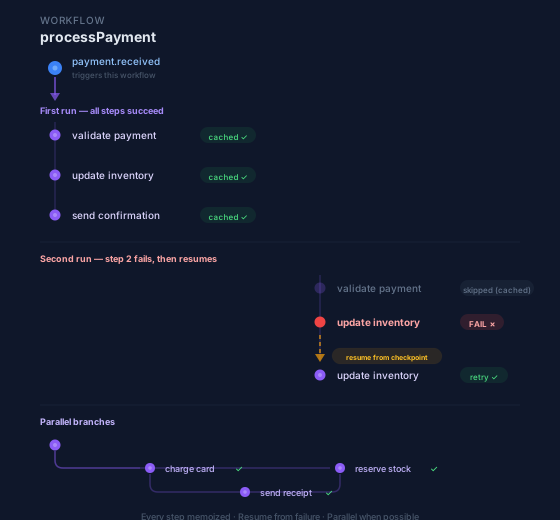
| Step | A recorded fact within a function. Steps are memoized—if a workflow restarts, completed steps aren’t re-executed. |
| Event | A permanent recorded fact that triggers a workflow (e.g., order.placed, user.signup). |
| Run | A single execution of a function, triggered by an event. |
How it works:
- You define functions with steps using the SDK
- Register functions with the Ironflow server (push or pull mode)
- Trigger events from your application
- Ironflow executes functions, recording each step result as a permanent fact — enabling replay, debugging, and history navigation
Real-time events: For subscribing to workflow events in real-time, see the Events & Pub/Sub guide.
Installation
The @ironflow/* npm packages are public and install without authentication. For building from source, see the Local Development guide.
npm install @ironflow/node# orpnpm add @ironflow/nodeThe Go SDK is publicly available via GitHub:
go get github.com/sahina/ironflow-go/ironflow@latestLocal Development
# Start Ironflow server./build/ironflow serve
# Dashboard: http://localhost:9123# API: http://localhost:9123/api/v1
Register your function endpoint in the dashboard or via API, then trigger events to test.
Quick Start
Here’s a minimal workflow to get started:
import { ironflow } from "@ironflow/node";
export const helloWorld = ironflow.createFunction(  {    id: "hello-world",    triggers: [{ event: "hello.triggered" }],  },  async ({ event, step }) => {    const message = await step.run("create-message", async () => {      return `Hello, ${event.data.name}!`;    });
    return { message };  },);
import "github.com/sahina/ironflow-go/ironflow"
var HelloWorld = ironflow.CreateFunction(ironflow.FunctionConfig{ ID: "hello-world", Triggers: []ironflow.Trigger{{Event: "hello.triggered"}},}, func(ctx ironflow.Context) (any, error) { var data struct { Name string `json:"name"` } if err := ctx.Event.Data(&data); err != nil { return nil, err }
message, err := ironflow.Run(ctx, "create-message", func() (string, error) { return fmt.Sprintf("Hello, %s!", data.Name), nil }) if err != nil { return nil, err }
return map[string]string{"message": message}, nil})Triggering Workflows
Workflows run when a matching event is sent. You can trigger events from your application code, the CLI, or the REST API.
import { createClient } from "@ironflow/node";
const client = createClient({ serverUrl: "http://localhost:9123" });
// Fire-and-forgetawait client.emit("hello.triggered", { name: "Alice" });
// Wait for the run to completeconst result = await client.emitSync("hello.triggered", { name: "Alice" });
client := ironflow.NewClient(ironflow.ClientConfig{ ServerURL: "http://localhost:9123",})
// Fire-and-forgetclient.Emit(ctx, "hello.triggered", map[string]any{"name": "Alice"})
// Wait for the run to completeresult, err := client.EmitSync(ctx, "hello.triggered", map[string]any{"name": "Alice"}, 30*time.Second)# Fire-and-forgetironflow emit hello.triggered --data '{"name": "Alice"}'
# Wait for the run to completeironflow emit hello.triggered --data '{"name": "Alice"}' --waitcurl -X POST http://localhost:9123/api/v1/events \ -H "Content-Type: application/json" \ -d '{"name": "hello.triggered", "data": {"name": "Alice"}}'You can also invoke a function directly by ID, bypassing event matching — see the REST API reference for POST /functions/{id}/invoke.
The underlying gRPC IronflowService exposes the event-ingestion RPCs SDKs and tooling use directly: Trigger and Emit (fire-and-forget event publish), TriggerSync (publish and wait for matched runs to complete), TriggerBatch (atomic batch publish), and PatchStep (scoped injection — overwrite a completed step’s output and resume). See api/proto/ironflow/v1/ironflow.proto for the full service definition.
For more details on event types, namespaces, and pattern matching, see the Events guide. SDK-specific options (idempotency keys, metadata, timeouts) are covered in the Node.js SDK, Browser SDK, and Go SDK references.
What’s Next?
- Defining Functions — Learn about function configuration and triggers
- Step Primitives — Understand run, sleep, sleepUntil, waitForEvent, parallel, map, invoke, and publish
- Execution Modes — Push mode vs. Pull mode
- Error Handling — NonRetryableError and signature verification
- Sagas & Compensation — Automatically undo completed steps on failure
- Debugging — Hot patching, scoped injection, time-travel debugging, TUI debugger, VS Code DAP
- API Reference — REST API, Events API, WebSocket