A Python Worker Survives the Restart
Your Python job has finished preparing its data. It has entered the next step when the worker dies. You restart the process. Does it prepare the data again?
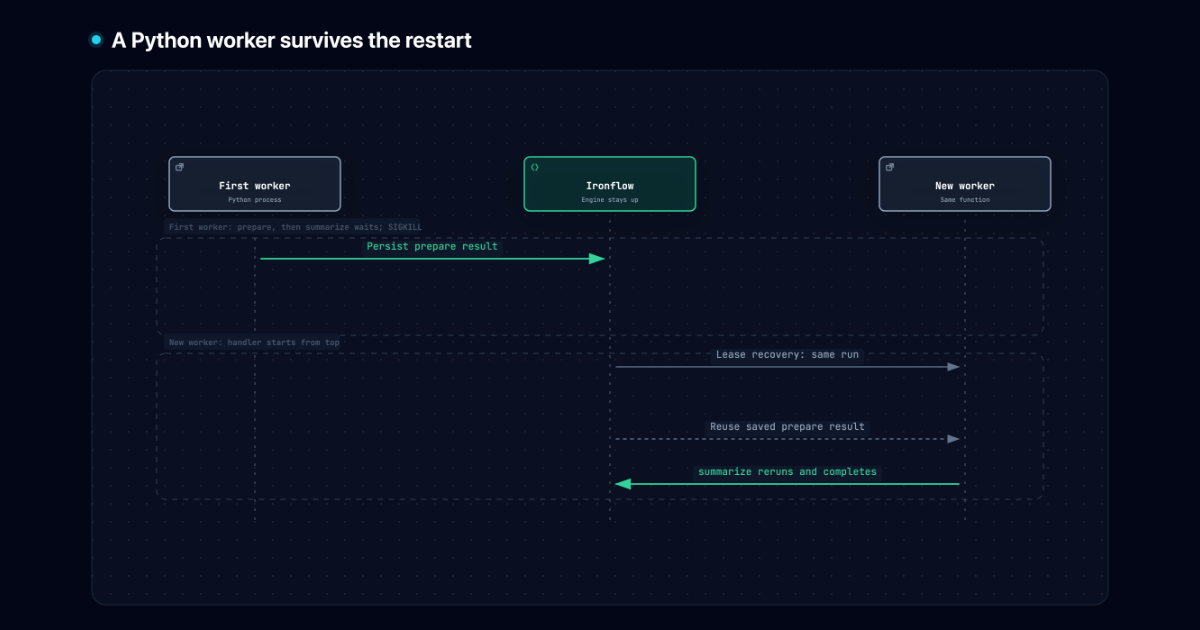
With a persisted durable step, Ironflow returns the saved result instead of calling that step’s body again. The handler starts from the top, but its completed work survives in the engine.
Python gained its worker runtime in Ironflow v0.40.0. This walkthrough uses a polling worker, two small calculations, and a deliberate pause so you can choose exactly when to kill the process. There is no model API, database service, or paid account to set up.
Start the engine and install the SDK
Section titled “Start the engine and install the SDK”Use Ironflow v0.42.0 and Python 3.10 or newer. The installation guide has the CLI downloads. The commands below use fish. In your first terminal, create a directory and start the local engine:
mkdir python-restartcd python-restartironflow versionironflow serve --dev --host 127.0.0.1Keep the engine running throughout the walkthrough. It stores the saved steps
in local SQLite and serves at http://localhost:9123. This experiment crashes
only the Python worker. --dev bypasses authentication; the loopback host keeps
this instance local.
In a second terminal, enter the same directory and install the matching SDK:
python3 -m venv .venvsource .venv/bin/activate.fishpython -m pip install ironflow-py==0.42.0set -gx IRONFLOW_SERVER_URL http://localhost:9123The distribution is ironflow-py; the import is ironflow. The unrelated
ironflow package on PyPI is not this SDK.
Give the worker two steps
Section titled “Give the worker two steps”Save this as worker.py:
import asyncioimport osfrom pathlib import Path
from ironflow.worker import Worker, function

@function(    id="python-restart",    triggers=[{"event": "demo.python.restart"}],    timeout="10m",    recording=True,    recording_profile="steps",)async def summarize_batch(ctx):    print(f"Handler entered for {ctx.run.id}", flush=True)
    async def prepare():        print("PREPARE body executed", flush=True)        return {"values": [12, 18, 30]}
    batch = await ctx.step.run("prepare", prepare)
    async def summarize():        print("SUMMARY waiting for continue.txt", flush=True)        while not Path("continue.txt").exists():            await asyncio.sleep(0.2)        values = batch["values"]        return {"count": len(values), "total": sum(values)}
    return await ctx.step.run("summarize", summarize)

if __name__ == "__main__": print(f"Worker PID: {os.getpid()}", flush=True) Worker(functions=[summarize_batch], max_concurrent_jobs=1).run()rm -f continue.txtpython worker.pyThe file is a gate for this demonstration. The second step waits until you
create it. asyncio.sleep yields to the event loop, allowing the worker to
heartbeat and checkpoint the first step while the second step is unfinished.
It is not ctx.step.sleep, which would yield the job back to the engine rather
than leave a running step to interrupt.
The recording options enable step audit events. Memoized step results are saved independently of that audit recording. The polling worker’s default checkpoint interval is one second, but a printed completion line is not proof that the engine has saved the result yet.
Trigger a run and confirm the checkpoint
Section titled “Trigger a run and confirm the checkpoint”Open a third terminal in the same directory. Activate its virtualenv and point the CLI and inspection client at the local engine:
source .venv/bin/activate.fishset -gx IRONFLOW_SERVER_URL http://localhost:9123ironflow function listWait until python-restart appears in the function list before emitting the
event. Then run:
ironflow emit demo.python.restartironflow run list --function python-restartEmit once. If the run list is initially empty, repeat the list command while the event dispatches. The worker prints something like:
Worker PID: 48123Handler entered for run_...PREPARE body executedSUMMARY waiting for continue.txtCopy the actual run ID and worker PID into fish variables in the third terminal:
set run_id run_REPLACE_WITH_YOUR_RUN_IDset worker_pid REPLACE_WITH_YOUR_WORKER_PIDironflow run get $run_idrun get shows the run status. To inspect step results too, save this as
inspect_run.py:
import osimport sys
from ironflow import IronflowRPCfrom ironflow.rpc import v1

with IronflowRPC(server_url=os.environ["IRONFLOW_SERVER_URL"]) as rpc:    run = rpc.runs.get(v1.GetRunRequest(id=sys.argv[1]))    steps = rpc.runs.get_steps(v1.GetRunStepsRequest(run_id=run.id)).steps
print(run.id, run.status.name)for step in steps:    print(step.id, step.step_id, step.status.name, step.output.to_python())
if run.status == v1.RunStatus.COMPLETED: assert run.output.to_python() == {"count": 3, "total": 60} assert [step.step_id for step in steps] == [ f"{run.id}:prepare:0", f"{run.id}:summarize:0" ] assert all(step.status == v1.StepStatus.COMPLETED for step in steps) print("Checked output:", run.output.to_python())python inspect_run.py $run_idWait until it shows a completed prepare step with {"values": [12, 18, 30]}.
Its step ID includes the run ID and an occurrence counter, ending in :prepare:0.
Repeat the inspection command if needed. The run should still be RUNNING,
and summarize has no completed result. Save the printed prepare row ID so
you can compare it after restart. Now the interruption point is backed by a
server-side record, rather than a delay you hope was long enough.
Kill the worker, then start it again
Section titled “Kill the worker, then start it again”In the third terminal, kill the specific Python process:
kill -9 $worker_pidSIGKILL gives the worker no chance to flush or drain. A normal Ctrl+C or
SIGTERM starts a bounded drain, so it would demonstrate a different shutdown
path. Leave the engine alone.
In the second terminal, restart the same file from the same directory:
python worker.pyKeep continue.txt absent until the resumed handler prints its waiting line.
Recovery is not immediate. The killed worker held a concurrency lease; the
engine must let it expire and recover the assignment before another worker
can take it. Allow roughly one to three minutes with the default settings.
An idle restarted worker during that interval is expected.
When the run comes back, the new worker prints:
Worker PID: 48210Handler entered for run_...SUMMARY waiting for continue.txtThe run ID is the same. PREPARE body executed does not appear again. The
handler called ctx.step.run("prepare", prepare), but Ironflow supplied its
saved result. The unfinished summarize body starts again.
Let it finish and inspect the result
Section titled “Let it finish and inspect the result”In the third terminal, release the gate and inspect the original run:
touch continue.txtpython inspect_run.py $run_idironflow run get $run_idRepeat the inspection until the run is COMPLETED. It should show two completed
steps, the original prepare row ID, and:
Checked output: {'count': 3.0, 'total': 60.0}The protobuf JSON values may display integers as floats. The script checks the
result and the two completed step names with assertions. You can also open
http://localhost:9123 and inspect this run in the dashboard.
For another run, remove continue.txt before emitting another event. When
finished, stop the worker and engine with Ctrl+C.
What a durable step cannot promise
Section titled “What a durable step cannot promise”This example’s calculations are safe to repeat. An external write needs more care. A payment provider might accept a charge, then the worker could die before Ironflow saves the step result. On recovery, the step body runs again.
Use the destination’s idempotency mechanism with a key that stays the same
across attempts, such as f"{ctx.run.id}:charge" for one charge per run. If
separate runs must represent the same business operation, use its business ID
instead. The destination must enforce that key; merely sending an extra field
does not deduplicate a write.
The same gap exists between a completed local calculation and its checkpoint.
Work after the last persisted checkpoint can repeat. That is why this
walkthrough confirms prepare in the engine before killing the worker.
Recovery reuses recorded results; it does not restore Python’s stack, preserve
an in-flight call, or make an external side effect exactly once.
Choose how to host the function
Section titled “Choose how to host the function”Worker polls over HTTP and suits a process you own. It needs no public callback
endpoint. Python also has StreamingWorker, which receives assignments over
ConnectRPC HTTP/2, and ironflow.serve, which hosts functions in a push-mode
ASGI app. They share the durable-step API; transport changes how work reaches
the handler.
The Python SDK reference covers their options, projections, agent APIs, and the test kit added with the Tier-1 runtime. Your Function Outlived Its Host explains when a request’s time limit makes a pull worker the better host.