File Storage
Ironflow stores files for your app. You put a file in a bucket at a path. You read it back by the same path. You can give an end user a short-lived URL to upload or download one file. You can start a function when a file changes.
The model is the same in the Go, Node, browser and Python SDKs. It is a REST API under /api/v1/files.
The Model: Bucket, Path, Object
Section titled “The Model: Bucket, Path, Object”- A bucket holds files and the rules for them: a size cap, allowed content types, and two switches for events and signed URLs.
- A path names a file inside a bucket, for example
scans/2026/a.pdf. A folder is only a prefix of the path. You do not create it. - An object is the stored bytes. Each write makes a new object with a new ID.
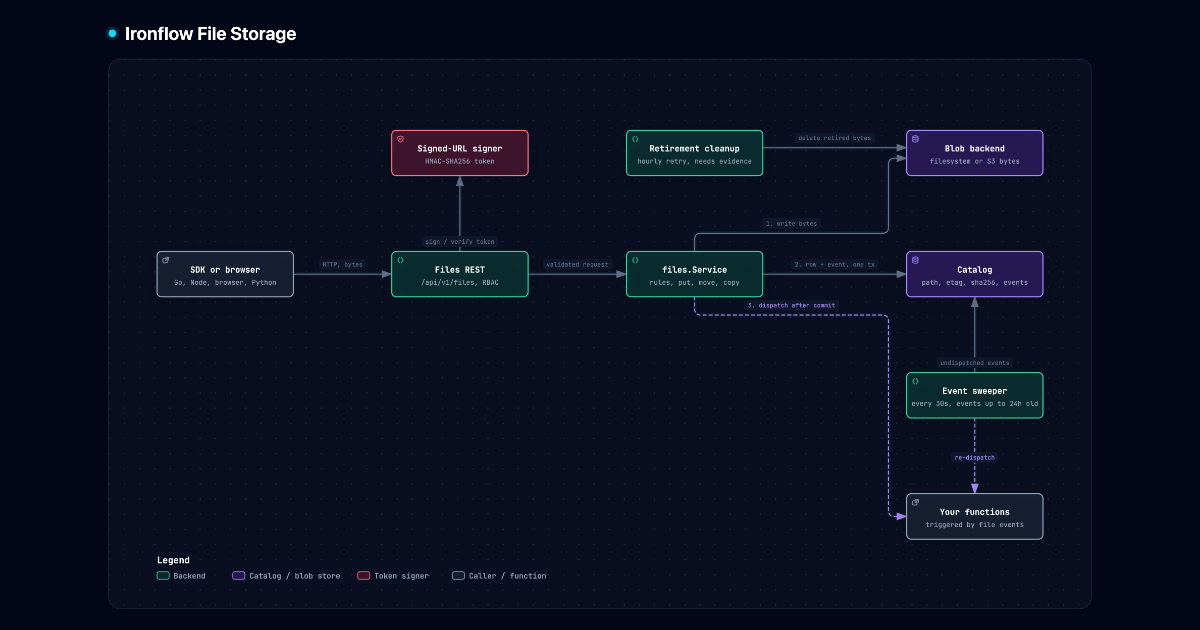
Ironflow keeps the metadata and the bytes in two places:
- The database catalog (SQLite or PostgreSQL) holds the path, size, content type, SHA-256 and user metadata.
- The blob backend (filesystem or S3) holds the bytes. It uses an opaque key that is based on the object ID.
Your path never reaches the blob backend. A move changes one catalog row. No bytes move.
When to Use Files vs. KV vs. Config vs. Secrets
Section titled “When to Use Files vs. KV vs. Config vs. Secrets”| Feature | Use For | Storage | Size |
|---|---|---|---|
| Files | Uploads, documents, images, exports | Database catalog + blob backend | 100 MiB per file by default |
| KV Store | Sessions, caching, counters | NATS JetStream KV | Small values |
| Config | App settings, feature flags | NATS JetStream KV (SYS_config_*) | Small JSON documents |
| Secrets | API keys, passwords, certificates | NATS JetStream KV (SYS_secrets_*), encrypted | Small values |
Use KV for small values that you read often. Use Files for data that is large, has a content type, or goes to an end user.
Consistency
Section titled “Consistency”- A reader sees the old version or the new version of a file. A reader never sees a mix.
- The ETag of a file is its object ID. It changes on every write. A move keeps the ETag, because the object does not change.
If-None-Match: *creates a file only when the path is free.If-Match: <etag>overwrites or reads only that version. A failed precondition returns412.- Two writes to one path at the same time: the last commit wins.
Signed URLs
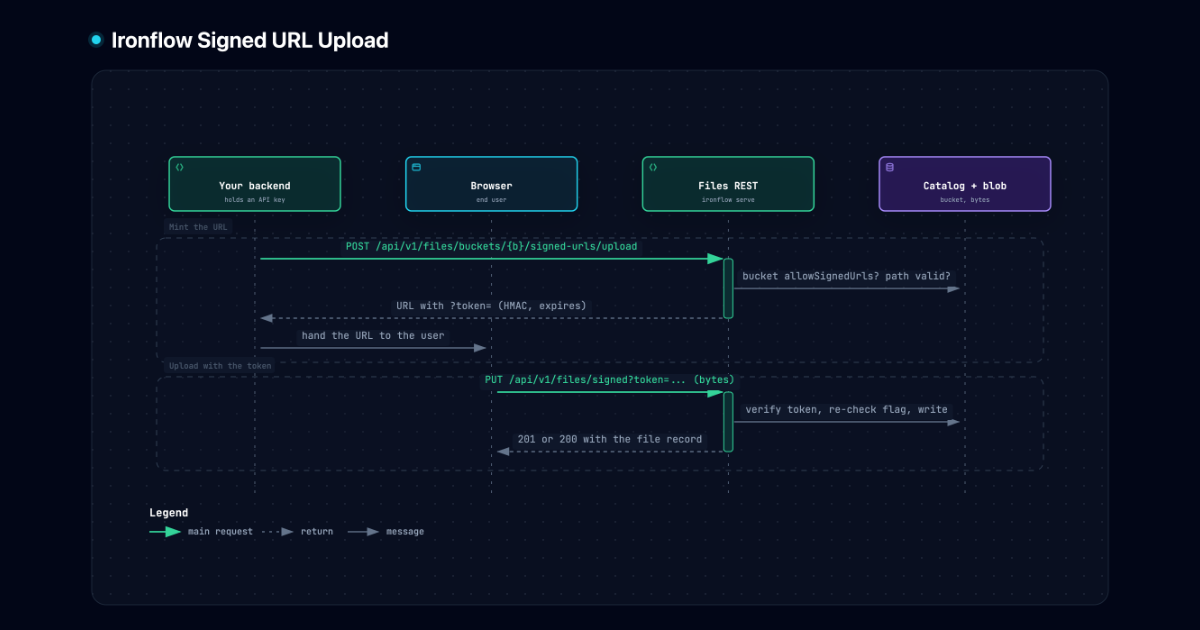
Section titled “Signed URLs”A signed URL gives an end user a short-lived link to upload or download one file. The user needs no Ironflow credentials. The token in the URL is the credential.
- Your backend creates the URL. The browser sends the file with a plain
fetch. - The token is signed with HMAC-SHA256. The key comes from the JWT secret (
auth.jwtSecret). - Signed URLs are opt-in for each bucket. Set
allowSignedUrls: trueto use them. - To revoke every URL of a bucket, set
allowSignedUrls: false. Ironflow checks the flag on every use. - An upload URL can limit the size and the content type.
- In v1, all bytes pass through Ironflow. A signed URL points to Ironflow, not to S3.
- In a cluster, every node must use the same
auth.jwtSecret. If not, creating a signed URL returns503.
Events
Section titled “Events”A file change can start a function. Ironflow emits these events:
ironflow.file.created,.updated,.deleted,.movedand.prefix_moved. A bucket emits file events whenemitEventsistrue.ironflow.bucket.created,.updatedand.deleted. Ironflow always emits these.
Ironflow writes the event in the same transaction as the change. Both commit, or neither does. Ironflow dispatches the event after the commit.
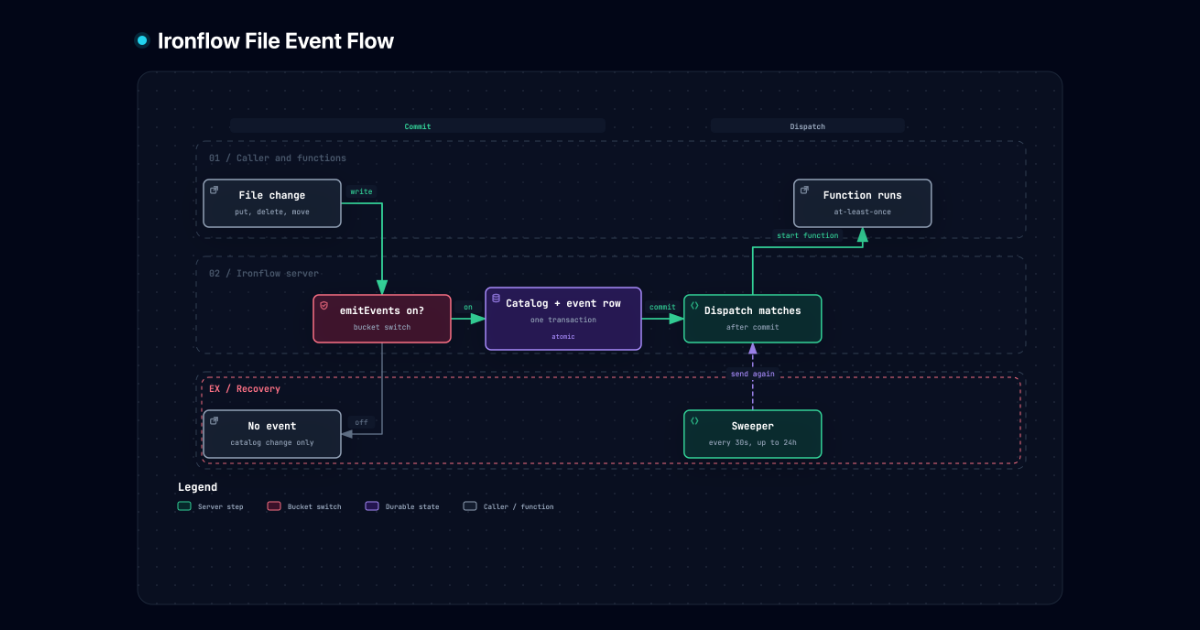
If a crash stops the dispatch, a recovery sweep sends the event again. The sweep runs every 30 seconds. It covers events up to 24 hours old. Function triggering is therefore at-least-once within 24 hours. A function can run more than once for one event. Make the function idempotent. Use the etag as the key, because it is new on every write.
Each sweep pass takes at most 100 events from each environment. An event that fails again waits longer each time (1 minute, then 2, up to 1 hour). After 10 failed attempts the sweep stops trying it. The event stays unprocessed, so you can still find it. Only an error from a function counts as a failed attempt. If the database, NATS or the engine is down, the sweep waits 1 hour and does not count the attempt. A long outage therefore does not stop the sweep for every event.
A replayed event creates the missing function runs. Replay does not directly
wake workflow waits or trigger cancel-on rules. Separately, waitForEvent
checks retained events whose storage time falls between run creation and the
wait deadline. A matching file event in that window can therefore recover a
wait after a crash between commit and live dispatch. A run created after that
event’s storage time cannot consume it through this history check. See
event wait timing.
A replay also never replaces a debounce slot that holds a newer event.
The prefixes ironflow.file. and ironflow.bucket. are reserved. Only the platform emits them. A client emit of such a name is rejected. All reserved names are listed in Reserved names.
To act on one bucket, use a CEL expression on the trigger, for example data.bucket == 'inbox'.
Retired and unexplained objects
Section titled “Retired and unexplained objects”Overwriting or deleting a file records retirement of its previous object in the same database transaction as the catalog change. This happens even when the bucket does not emit events. A definite failed upload or copy records retirement of its fresh target before attempting cleanup. An uncertain catalog commit preserves the target without recording retirement, because its file row may still commit.
Immediate cleanup verifies committed retirement evidence and checks that no current file row references the object. It then deletes the bytes and acknowledges the evidence. Failed cleanup leaves evidence for an hourly retry. Each node traverses queue pages of at most 1000 entries, advances past failures and conflicts, and checks references in batches of 500. Normal background cleanup never lists blob storage. Uploads remain capped at 45 minutes; immediate cleanup has a separate 30-second budget that continues after request cancellation.
A missing file row or an old object does not authorize deletion. Crash leftovers, filesystem temporary files, legacy objects, and objects from definite failures whose retirement could not be recorded remain unexplained. An S3 upload that times out on the client can still finish later. Cleanup then deleted a key that did not exist yet, so the finished object also remains unexplained. Ironflow does not backfill retirement from a prefix listing. After a database restore, unexplained objects still present in storage survive cleanup. Restoring the database cannot recover bytes deleted before the restore.
files.reconcile defaults to on, which retries recorded retirements. dry-run reports queued work and inspects every page under each environment’s file prefix. It distinguishes eligible queued objects, live objects, conflicting live retirement evidence, and unexplained objects, with at most 20 sample keys per log line. It changes neither bytes nor queue state. If a backend cannot list object information, dry-run reports that inspection is unavailable and still reports queued work. off starts no background worker. Explicit API overwrite and delete cleanup runs in every mode. IRONFLOW_FILES_RECONCILE overrides the YAML setting.
Never share a bucket prefix between independent deployments. The evidence rule protects distinct foreign object IDs after an accidental overlap. Writable catalog clones that reference the same physical object IDs need coordination across catalogs and remain unsupported. Internal catalog callers must never reattach a retired object ID, even after cleanup has acknowledged its retirement. Public uploads and copies always allocate fresh IDs.
ironflow_file_orphans_reclaimed_total counts successful background deletion calls. ironflow_file_orphan_bytes_reclaimed_total sums their known queued sizes; unknown sizes contribute zero. Both are approximate work counters because retries and concurrent workers may count the same object again. Immediate API cleanup does not increment them. The statistical page guard has been removed.
Limits and What Is Not in v1
Section titled “Limits and What Is Not in v1”| Limit | Value |
|---|---|
| File size | 100 MiB by default (files.maxObjectBytes). A bucket can set a lower cap. |
| Path | 1 to 1024 bytes |
| Directory move | 10,000 files in one transaction |
| Signed URL TTL | 900 s by default, 7 days at most |
Not in v1:
- Multipart or resumable upload. Each upload needs
Content-Length. - Object versions. A write replaces the old object.
- Directory copy.
- Quotas for a bucket or an environment. On the filesystem backend, a large upload can fill the disk.
- Direct upload to S3 with a pre-signed S3 URL.
- Per-file access control. A policy names the bucket, not the path.
In This Section
Section titled “In This Section”- Files Guide — Buckets, upload, download, move, signed URLs and events, with code in each SDK.
- Blob Storage — Set the filesystem or S3 backend that holds the bytes.
- SDK reference — Node, Browser, Go and Python.
- ADR 0035 — Why file storage uses an embedded or S3 blob backend.